Travelogue: George Peabody Library

Posted: November 19, 2009 at 10:30 am by Cynthia Requardt in Learn the Library | No Comments

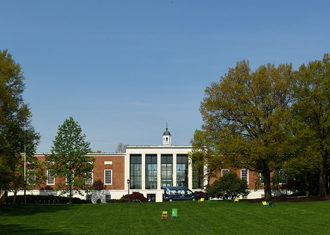
If architectural beauty and historic research collections are important to you, then you should visit the George Peabody Library. The collection was started in 1860 as part of the Peabody Institute and is a Victorian research library with over 300,000 volumes.

Notable collection strengths are archaeology, British art and architecture, British and American history, biography, English and American literature, Romance languages and literature, history of science, and exploration and travel.

To learn more about the library, register for the Spring course “Reading Culture in the Nineteenth-Century Library” meeting at the Peabody Thursdays 2-4:20.

The George Peabody Library is open to readers Tuesday – Friday, 9 am – 5 pm. Its collection does not circulate. They are located at 17 E. Mount Vernon Place.

Travelogue: Friedheim Library

Posted: November 12, 2009 at 10:10 am by Ursula McLean in Learn the Library | No Comments

The Arthur Friedheim Library is the music library of the Peabody Institute of Johns Hopkins, and its primary purpose is to support the curriculum of the Peabody Conservatory. The Friedheim Library contains about 130,000 items including individually cataloged books and periodicals about music, musical scores and sound recordings, manuscripts, rare books, and microfilms. It houses performance materials for individuals and for groups up to nine players, scores for ensembles of whatever size, and research materials that support graduate level music study. The Peabody Archives located on the second level of the library houses the papers of the Peabody Institute, some of its founders and faculty, and other area performing groups.

The Friedheim Library serves the faculty and students of the Peabody Conservatory, the Peabody Preparatory Division, and all other divisions of the Johns Hopkins University. The library is located on the plaza level of the New Building in the northeast corner of the Peabody campus. Entrance is through the main entrance to Peabody at 17 East Mt. Vernon Place. The security guard will direct you to the Friedheim Library. Identification is required.

Picture This: A Research Guide for Visual Information

Posted: November 6, 2009 at 10:15 am by Donald Juedes in Learn the Library | No Comments

Do you need an illustration of an artwork for a class presentation? A diagram of a chemical compound? A photograph of an historical figure? An illustration of a shark’s anatomy? More and more people across many disciplines find that they need visual information for their coursework. But, as many of you know, good images can be hard to track down.

The Eisenhower Library is once again trying to make your academic life a little easier with its new Finding Images Research Guide. In addition to helpful links to digital image databases and reliable Internet image resources across many fields of study, the guide also gives tips on how to use bibliographic databases for image searching and how to cite, save, and present images as part of your scholarly endeavors. So, if image is everything to you, please check out this new guide.

Travelogue: John Work Garrett Library

Posted: November 5, 2009 at 11:50 am by Cynthia Requardt in Learn the Library | No Comments

While the Rare Books and Manuscripts department of MSEL has many wonderful books, there are other Hopkins libraries that also house older and rare works.

The John Work Garrett Library at the Evergreen Museum and Library contains 30,000 volumes that cover a wide variety of topics. Their natural history collection includes several important ornithological works, like the Audubon ‘double elephant folio’ edition of Birds of North America. There is a strong collection of 16th- and 17th- century English literature and history featuring works by Shakespeare, Bacon, Milton, and Spenser. Other important collections focus on architectural history and American colonial travel and history.

The JHU Catalog includes the books at Garrett Library; you’ll see the collection location of Garrett Library - Library Room. You need to make an appointment to use the collection (call 410-516-8348). Tours of the Evergreen Museum and Library are offered, but you can’t touch the books on the tour.

Travelogue: MSE Library

Posted: October 29, 2009 at 8:23 am by Margaret Burri in Learn the Library | No Comments

Looking for the scholarly and the social heart of the Homewood Campus? Look no further than the Milton S. Eisenhower Library.

Scholarly heart? Named in honor of the 8th president of the university (and the brother of Dwight Eisenhower), MSEL is the university’s principle research library, with over 3.7 million books, almost 900 databases, over 70,000 electronic resources, and an extensive collection of rare books and manuscripts. Its rich holdings are available to students and faculty of all divisions, and a cadre of expert reference librarians are available to help with research needs.

Social heart? The library is the home-away-from-home for JHU students, especially during exams. We’re open 24/7 during the semester, and offer group study space, as well as quiet study areas. Cafe Q offers a place to relax with friends, as well as a place to meet with faculty for formal and informal discussions.


Oh, the Humanities!

Posted: October 25, 2009 at 5:30 pm by Brian Shields in Events and Exhibits, Learn the Library | No Comments

On Wednesday, October 28, from 4:30 to 5:30, librarians from the Humanities will offer demos and answer questions about newly acquired resources and rare books and manuscripts.

Subject specialists will guide you through a tour of slavery databases, women’s studies databases, image resources, and early issues of The Crisis, W.E.B. DuBois’ magazine.

Come to the MSE Library’s Garrett Room on Q-level, and see what we’ve gotten for you lately. Free coffee provided by the Friends of the Johns Hopkins Libraries. All Hopkins affiliates welcome.

Travelogue: JHU Libraries

Posted: October 22, 2009 at 8:04 am by Robin Sinn in Learn the Library | No Comments

As most of you are aware, there are a number of libraries associated with The Johns Hopkins University. This blog is written primarily by librarians associated with The Sheridan Libraries. We generally think of our audience as the faculty, students, and staff of the Homewood schools.

But we know many of you use resources and materials from other Hopkins libraries. Some of you travel between campuses and see different libraries. Some of you request material from other libraries that is delivered to you; you don’t see the other libraries.

So we’ve put together a travelogue of the larger Hopkins libraries. You’ll be seeing the posts through December; one each week. We’ll start next week with MSEL and move on from there. Enjoy!

She Blinded Me with Science! (also, Engineering)

Posted: October 11, 2009 at 5:00 pm by Brian Shields in Events and Exhibits, Learn the Library | No Comments

OK, our subject specialists won’t really blind you with science (or anything else for that matter). But you will be dazzled by all the great new resources available for your science and engineering research.

On Wednesday, October 14, from 4:30 to 5:30, librarians from science and engineering will offer demos and answer questions about newly acquired resources and databases.

Want to explore the latest e-books and databases? Curious about the new and improved PubMed? Join us for an hour and learn about the new online science and engineering resources from the Sheridan Libraries.

Come to the MSE Library’s Garrett Room on Q-level, and see what we’ve gotten for you lately. Free coffee provided by the Friends of the Johns Hopkins Libraries. All Hopkins affiliates welcome.

Where is my article?

Posted: October 2, 2009 at 8:00 am by Sue Waterman in Learn the Library | No Comments

THE most frequent question we librarians get is - where can I get my article online? The answer can be quite complicated, but in a nutshell, here is how you can find your article.

  • From the Libraries Home Page, click on the link (right side of page): Search a citation.
  • Then type in your journal title in gray box on the next screen.
  • Our amazing “Find It” software will look for any and all online access we have to that journal.
  • Now it’s just a matter of matching up the year and volume of your citation to the online coverage of our many e-journal providers.

Simple enough, but what if the journal has NO online coverage? Well, look at the screen again, to see if found a record in the catalog. If so, you’ll have a call number to locate your article in hard copy (the old-fashioned print volumes).

Okay, what if finds nothing? Not to worry. You can order a copy from Interlibrary Services. Click on the link on the screen for MSE Borrowers, under “Request a copy from Inter-Library Loan.”

Problems? Ask a librarian.  We’re used to finding articles!

Register for a RefWorks Workshop

Posted: October 1, 2009 at 9:00 am by Elizabeth Uzelac in Events and Exhibits, Learn the Library, Tech Tips | 1 Comment

Does the sound of easy bibliographies and organized research appeal to you? If so, consider registering for a RefWorks workshop in October or November at the Milton S. Eisenhower Library. Attend one of these 90-minute sessions and learn how to trim hours off of your time spent researching and writing.

Workshops Dates and Registration
Registration is required. Workshops are open to any Hopkins affiliate.

RefWorks is an online citation manager that helps you keep track of citations to books, articles, and other documents you gather during research. It is free to all JHU users, web-based, and requires no special download of software. Using RefWorks, you can also create properly formatted bibliographies, and import citations from research databases and the JHU Libraries Catalog.

Workshops will cover accessing your account, getting citations into RefWorks, creating bibliographies with the click of a button, sharing reading lists in RefWorks, and more. RefWorks exports bibliographies in over 700 citation styles, saving time for those of you who may be writing for class or publication.

Can’t make a class? You can also watch a tutorial online.

Next Page »

© 2008 The Sheridan Libraries Blog | Powered by WordPress with Pool theme design by Borja Fernandez.
Entries and comments feeds. Valid XHTML and CSS.
The views and opinions expressed in this page are strictly those of the blog author(s). The contents of this page have not been reviewed or approved by The Sheridan Libraries of The Johns Hopkins University.